- Sep 4
The AI Model Reference: A Guide to Selecting Open Weight Models
- Larry Maguire
- Artificial Intelligence
- 0 comments
Every major AI lab names its models differently and publishes different version tags. It can be very confusing for those of us outside the AI development world, trying to differentiate between Fable 5.1, Opus 5, Kimi K3, DeepSeek V4 Pro, Gemma, Llama, Ollama... All of these ambiguous names with strange numbering and varying capabilities, not to mention the meaningless (to those outside the industry) benchmark tests they publish. How can we possibly understand what is good, bad, or otherwise for our particular situation?
So I created this guide as a quick start, something that allows you decide what models might be good for your needs. It doesn't attempt to cover every model available because there are simply too many. But what it will do is give you a short list of AI Models that you can compare with the ones you're perhaps familiar with. From the AI models with arguably the highest capability (Fable 5.1, GPT-6 Astra, and Kimi K3) to the simplest and least complex that can run on your local hardware (Gemma 4, Qwen 3.5). The subset of models I have selected will perhaps simplify the decision making process.
View the Interactive Reference Sheet
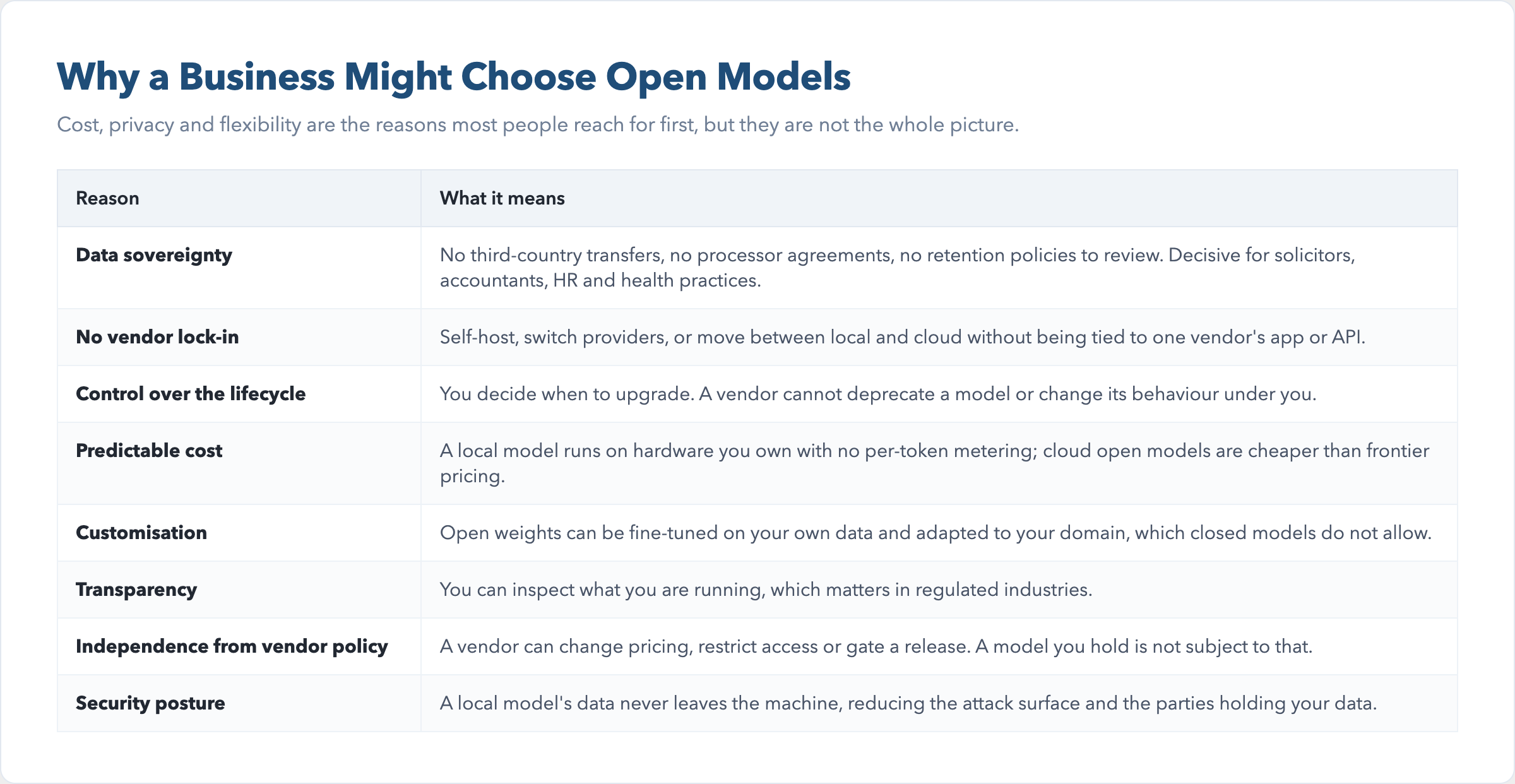
Why a Business Might Choose Open Models
Cost, privacy and flexibility are the reasons most people reach for first, but they are not the whole picture. A business weighing open models, whether run locally or in the cloud, is usually weighing several things at once.
Data sovereignty and compliance. No third-country transfers, no processor agreements and no retention policies to review. For a solicitor, an accountant, an HR consultancy or a health practice, this is often the deciding factor.
EU data residency. A closed frontier model sends your data to the vendor's servers, and many of those sit outside the EU. An open model run locally keeps the data in your own jurisdiction, which sidesteps the residency question entirely.
No vendor lock-in. Open weights mean you can self-host, switch providers, or move between local and cloud without being tied to one vendor's app or API.
Control over the model lifecycle. You decide when to upgrade. A vendor cannot deprecate a model or change its behaviour under you.
Predictable cost. A local model runs on hardware you own with no per-token metering, and cloud open models are cheaper than frontier pricing.
Customisation. Open weights can be fine-tuned on your own data and adapted to your domain, which closed models do not allow.
Transparency and auditability. You can inspect what you are running, which matters in regulated industries.
Independence from vendor policy. A vendor can change pricing, restrict access or gate a release. A model you hold is not subject to that.
Security posture. A local model's data never leaves the machine, which reduces the attack surface and the number of parties holding your data.
The trade-off that runs through all of them is capability and speed, which usually sit with the closed frontier. The decision is how much of each of these you need against how much raw performance you are willing to forgo. The thing is, we're in a period of great flux with this technology, and after a while I expect things to settle down. There might be a bust beforehand, but I think it's fair to see that hardware costs may fall in the future and running AI locally may be easier.
Open and Closed
Every model falls into one of two camps.
Closed Models are the ones you rent from the Frontier labs such as Anthropic, OpenAI, and Google. They all keep their frontier model weights private, so you use them through the vendor's app or API and your data travels to the vendor's servers. There is no way to download them and run them on your own machine so you are bound, and perhaps limited, by the vendor's applications.
Open Models are the ones you can download and run yourself. Meta, Mistral, DeepSeek, Alibaba, Moonshot, Nvidia, Z.ai, Microsoft, Cohere and IBM all publish their weights. You download the model and run it yourself, usually through a provider such as Ollama or LM Studio. Your text prompts and files never leave your machine unless you choose to send somewhere else.
This distinction shapes the question of privacy, hardware and cost. A model you can run locally is a different thing from a model you rent from a frontier provider or third party. However, privacy is often a trade-off with capability and speed.
How Smart Is The Model
I use four tiers as shorthand for reading a model's capability. They are Frontier, Advanced, Standard and Light, and they let you judge a model at a glance without digging through benchmark tables.
Frontier is the top of the market, the strongest models available.
Advanced is one step below Frontier.
Standard is the balanced workhorse for everyday work.
Light is fast and cheap, good enough for routine tasks.
Anthropic's lineup maps onto the scale:
Fable is Frontier
Opus is Advanced
Sonnet is Standard
Haiku is Light
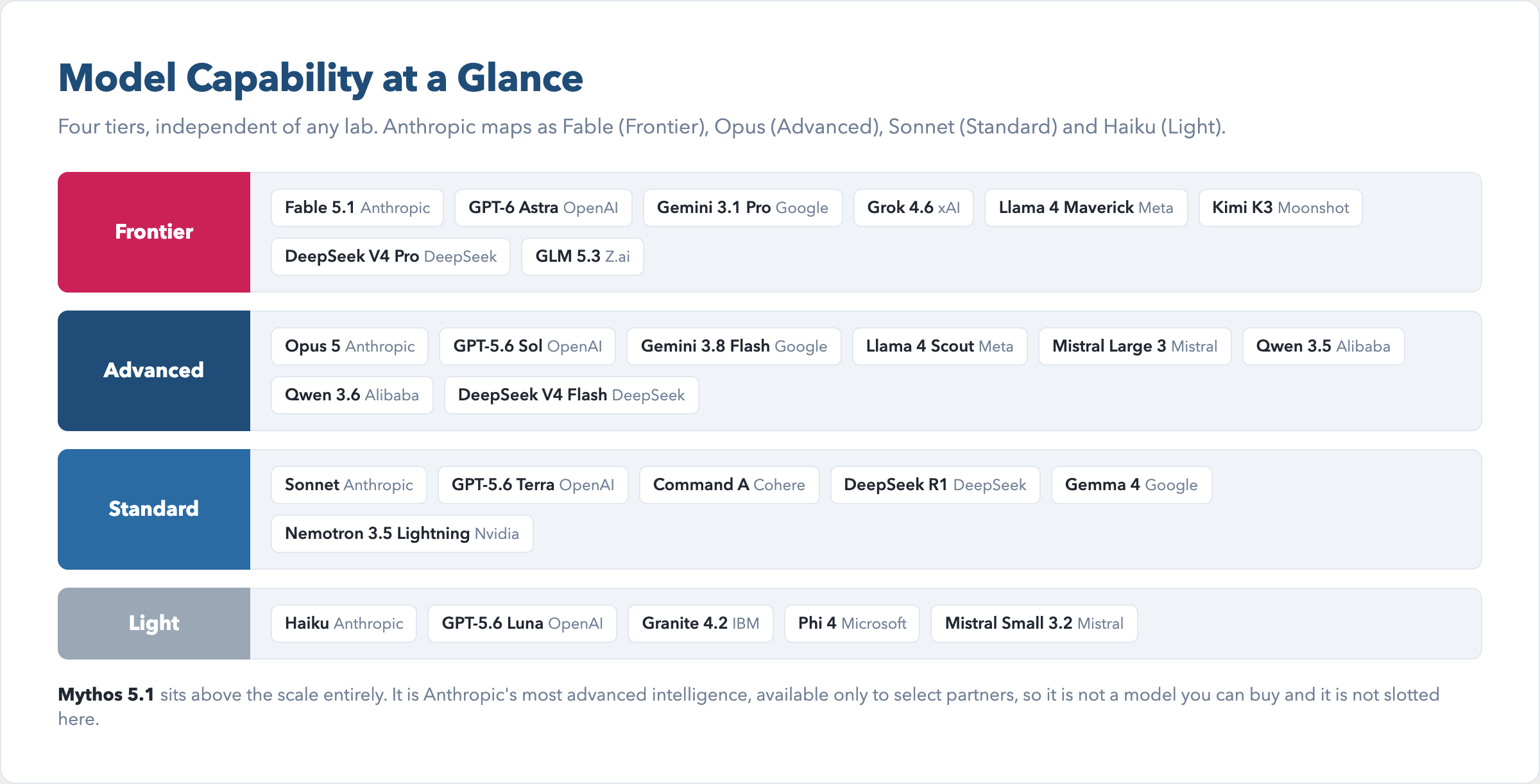
Arguably, one model sits above the scale entirely, Mythos 5.1, Anthropic's most advanced intelligence. It is available only to select partners, so it is not a model you can buy and it is not slotted here.
Whether Mythos 5.1 still holds top spot is an open question because OpenAI released GPT-6 Astra just yesterday, 3rd of September 2026. OpenAI describes it as a generational leap that could mark the arrival of artificial general intelligence. Well, we'll see. If you have read any of my previous posts on this idea, whether or not DC current flowing through printed circuits etched in silicon can achieve human level intelligence, then you will take that claim with a large pinch of salt. Every couple of months a new apparently more capable model appears on the scene, so we'll see how things develop. If the AI technology bursts it might put paid to these fantastic claims, at least for the time being.
The Tools Question
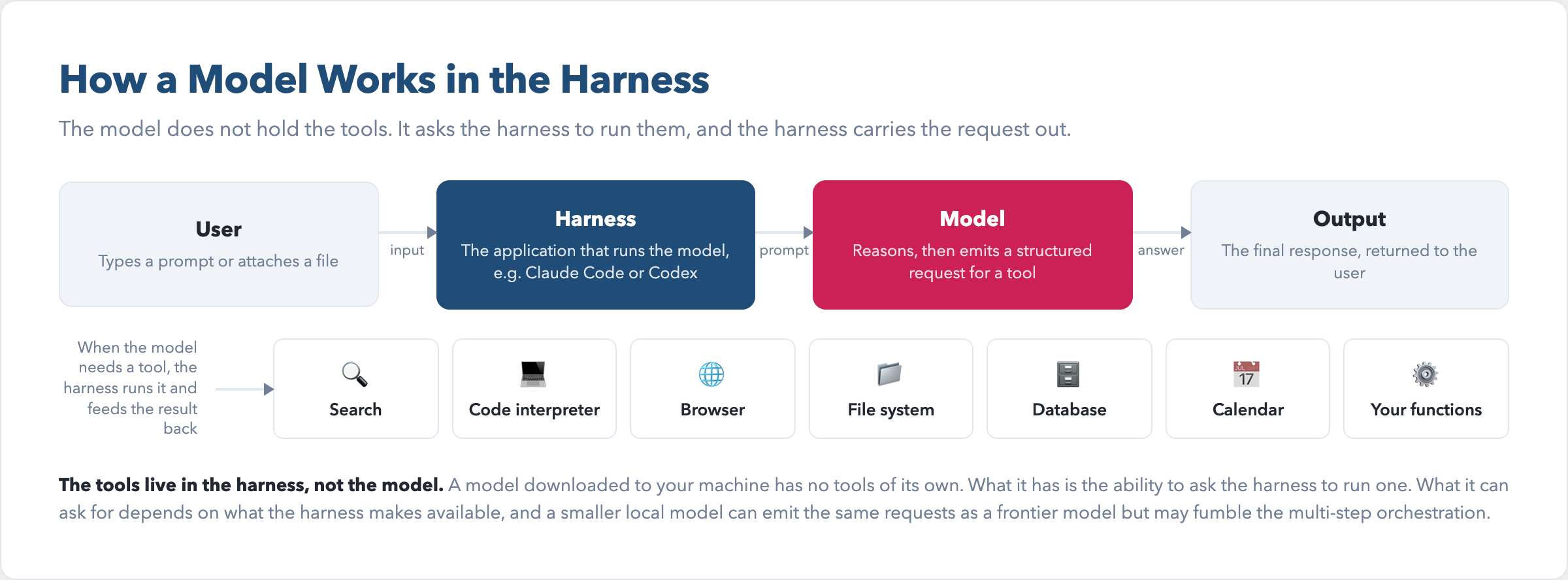
The tools do not live in the model. They live in the harness, the application that runs the model. A model downloaded to your machine has no tools of its own. What it has is the ability to emit a structured request asking the harness to run a tool, and the harness then carries that request out.
What the model can ask for depends on what the harness makes available to it. A search engine, a code interpreter, a web browser, a file system, a database, a calendar or your own functions are all tools the harness can expose. Thinking mode, where the model reasons step by step before answering, is now standard on the reasoning models. DeepSeek V4 Pro has three thinking modes, none, thinking and max, while GLM 5.3 has low, high and max, and Granite 4.2 has low and high.
A smaller local model can emit the same tool requests as a frontier model, but it may fumble the multi-step orchestration that the frontier model handles routinely. When a model is described as supporting tool calling, that means it can ask for a tool. It does not mean it will use that tool well on a hard task.
Tool access is not equal across harnesses, even when the model is the same. Anthropic's Claude Code and OpenAI's Codex are harnesses that give a model deep access to your machine, your files, your terminal and your browser. A model running inside one of these harnesses can do far more than the same model running in a plain chat window.
Through Ollama you can often plug a third-party model into these harnesses, but the fit is not seamless. A harness is built around its native models, so an open model dropped into it may not use the tools as reliably. Anthropic's models are tuned to work with Claude Code, and OpenAI's with Codex. A third-party model inherits the same reach, but you may see reduced capability compared to the native model.
The Privacy Question
A closed model sends your text prompts and file content to the vendor's cloud servers. Whether that content is then used to train the vendor's models depends on the vendor and the account you hold.
OpenAI trains on content from its consumer services, ChatGPT and Codex, unless you opt out through your account settings. Once you opt out, new conversations are not used for training. Its business and API products are different: by default OpenAI does not train on that data at all. Anthropic follows a similar pattern. It trains on your inputs and outputs unless you opt out, and even after you opt out it may still use content that is flagged for safety review or that you explicitly submit as feedback.
Both labs also de-identify and aggregate data as part of their data minimisation. That is a privacy safeguard, not a way around your opt-out. Anthropic, OpenAI, Google and xAI each have their own data handling, and your prompts travel to their servers regardless.
An open model run locally keeps your text on your machine. There are no third-country transfers, no processor agreements and no retention policies to review. For a solicitor, an accountant, an HR consultancy or a health practice, that is the deciding factor.
Ollama's cloud models sit between the two. They are open weights running on Ollama's servers, so your text does travel to Ollama. The difference is what Ollama does with it. It processes your prompts and responses transiently, only for as long as the request takes, and states that it never trains on them. It collects account details and limited usage metadata, but not the content of your prompts. That is more private than a closed vendor in one specific way: your words are not used to train a model, and they are not retained.
It is not more secure, and the two are easy to confuse. Privacy is about what happens to your data. Security is about how well it is protected while it is in someone's hands. Ollama is a smaller company than Anthropic or OpenAI, with a shorter compliance record, and its cloud still transfers data to servers in the United States. A local model remains the only option where your text never leaves your machine at all.We need to expand on the hardware section.
The Hardware Question
If you plan to run a model on your own machine, the machine specs matter. The question to ask is not how powerful the model is, but whether your computer can run it along with everything else that you're asking your machine to do.
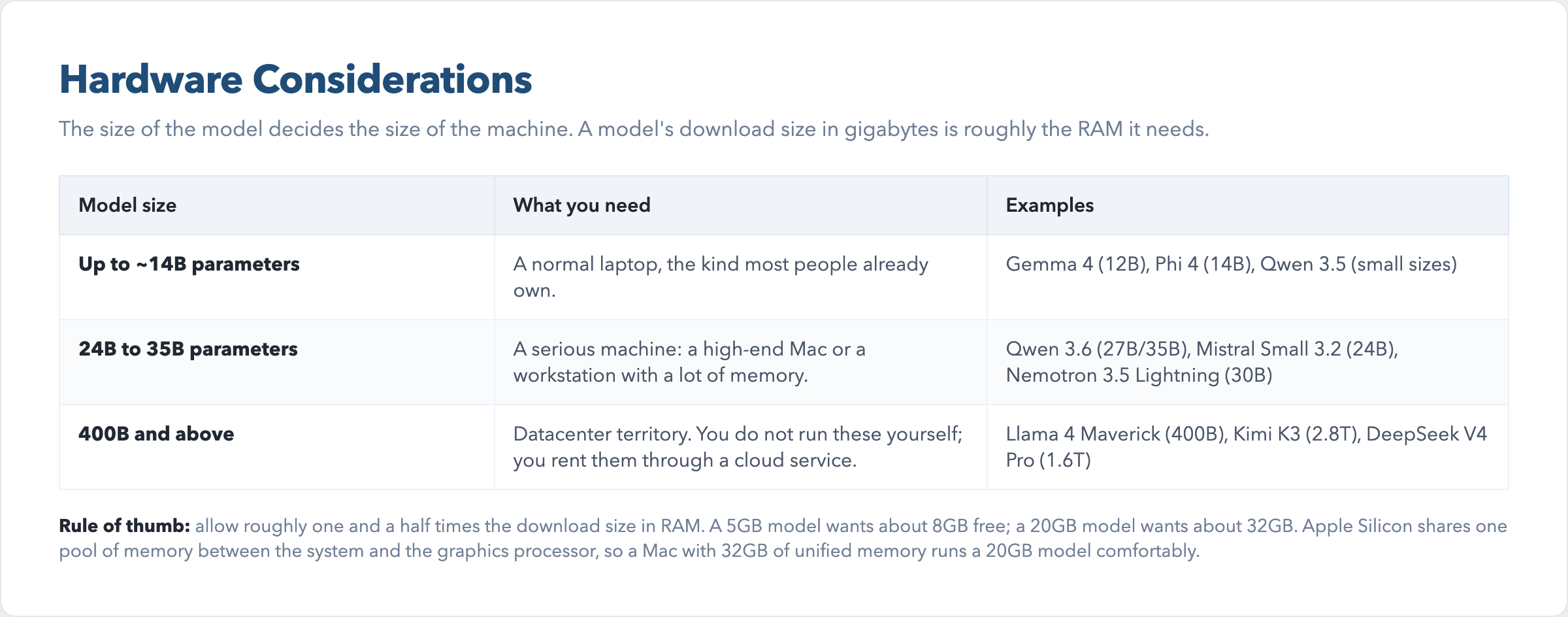
A model's download size in gigabytes (GB) is roughly the memory the machine needs to run it. When you run a model, the whole thing is loaded into your computer's random access memory, or RAM. RAM is the fast, short-term memory your computer uses while it is working, not the long-term storage on your hard drive. A model does not run from the hard disk. It has to be held in RAM all at once, and that is why the download size matters.
A 5GB AI model needs about 8GB of free RAM to operate effectively, and a 20GB model needs about 32GB of RAM. The rule of thumb is to allow roughly one and a half times the download size, because the model needs room to work without maxing out your machine. Don't forget, you'll need RAM capacity to operate other everyday functions.
Apple Silicon Macs arguably handle this better than most other machines. They share one pool of memory between the system and the graphics processor, so a Mac with 32GB of unified memory runs a 20GB model comfortably. A Windows laptop with the same 32GB is often split between system memory and a separate graphics card, so less of it is available to the model.
In plain terms, the size of the model decides the size of the machine RAM.
Models up to about 14B parameters run on a normal laptop, the kind most people already own.
Models from 24B to 35B want a serious machine, a high-end Mac or a workstation with a lot of memory.
Models at 400B and above, such as Llama 4 Maverick, are datacenter territory. You do not run these yourself. You rent them through a cloud service such as Ollama.
If you would rather not think about any of this, you do not have to. Every model in this guide can be run through a cloud service instead, and then the hardware question disappears. You pay for the convenience, and your data travels to someone else's server. The hardware question only matters when you want the model on your own machine.
The Quantisation Question
The same model ships in several sizes, and the size you download changes how much memory it needs. This is quantisation, the process of shrinking a model's weights to lower precision so it fits in less memory albeit at a small cost to quality of the output.
Ollama tags each size with Q4 the common default, a balance of size and quality. Q8 keeps more precision and costs more random access memory. MLX is Apple's machine learning framework, an optimised build for Macs. FP16 is full precision, the largest and closest to the original.
So the hardware rule above is not fixed. A model listed at 20GB might be 12GB at a lower quantisation level, or 40GB at full precision. When you see a download size, check which quantisation level it refers to.
There is a second way to run a model that is bigger than your memory which takes an alternative approach. Instead of loading the whole model at once, the software loads only the parts it needs at any moment and streams the rest from disk as required. This is called offloading, and it lets a model run on a machine that does not have the capacity for the full model.
The trade-off is speed. Reading from disk is far slower than reading from memory, so an offloaded model answers more slowly than one that fits entirely in RAM. For a business user, offloading is a way to try a larger model on modest hardware before committing to a bigger machine, not a permanent substitute for one.
Perhaps the overwhelming consideration to make when choosing local versus cloud AI models is the maintenance of the equipment. If you decide to run AI models locally on your own hardware, it is conceivable that within 12 months or two years the hardware will be somewhat redundant and incapable of running the latest models. So capital expenditure will need to be offset over this relatively short period. And so, running locally is not always the right choice.
As mentioned above, it's a trade-off against privacy and is usually a decision that differs in every organisation.
The Models
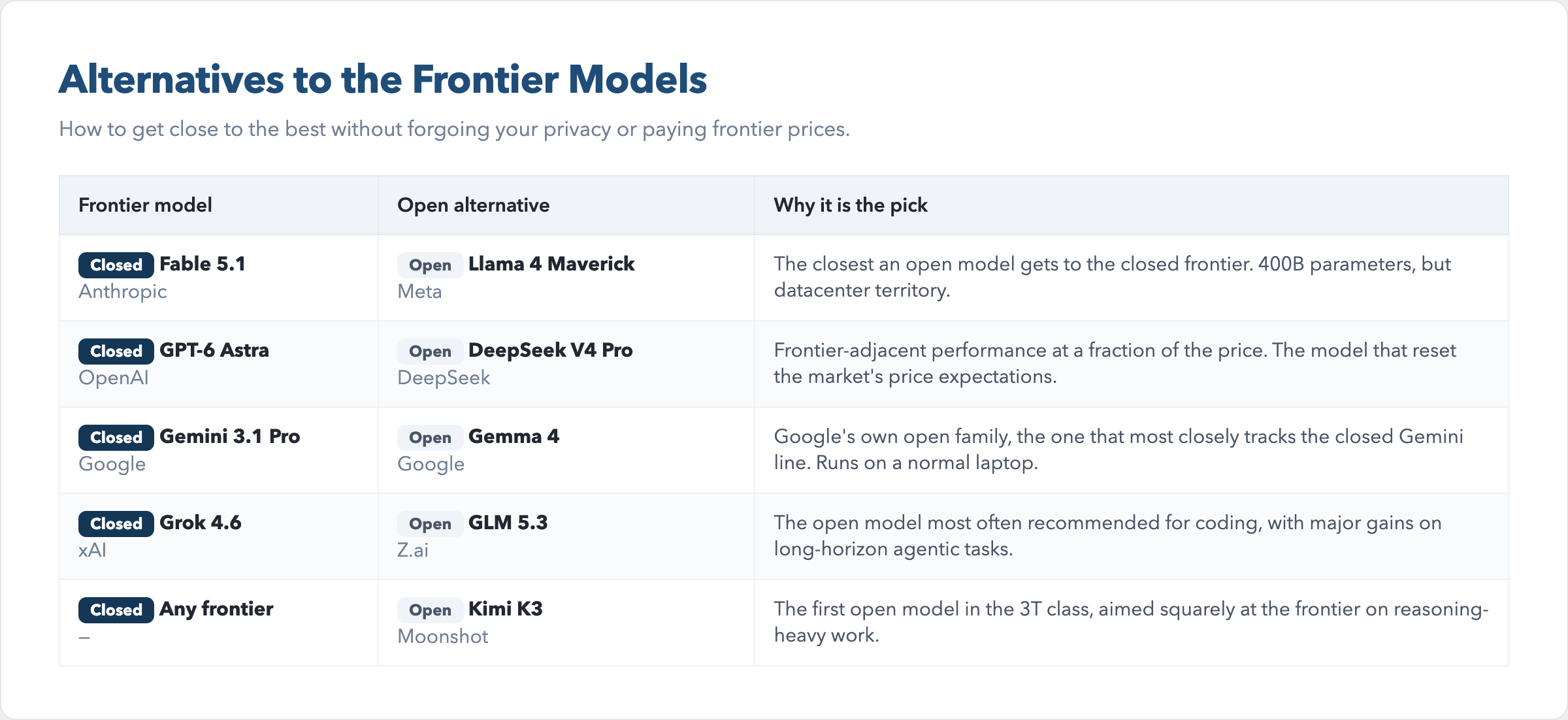
The models below are the ones worth your time exploring further. They are split into the open models you can run yourself, and closed frontier models you rent. For each open model I have noted how it compares to the closed frontier, because what we want to know is, how can I get close to the best without forgoing my privacy.
There are the factors we need to consider such as the extra cost involved in using frontier models such as Fable 5. It's a very capable model, but I found it consumes my tokens at a far greater rate. Also, I have found that Opus 5 is less capable than earlier models, and can be very frustrating to use. With frontier models, there is far less flexibility in my opinion. I don't like keeping all my eggs in one basket, so here are alternatives you perhaps should consider.
Llama 4 Maverick (Open)
Meta's largest open model, at 400B parameters. It is the default answer when someone asks what the strongest open model is, and it is the closest an open model gets to the closed frontier. It is too large to run on a normal machine, so in practice most people use it through a cloud service such as Ollama rather than downloading it.
Kimi K3 (Open)
Moonshot's 2.8-trillion-parameter model, the first open model in the 3T class. It is aimed squarely at the frontier, and on reasoning-heavy work it is often mentioned in the same breath as the closed leaders. Like Llama 4 Maverick, it is datacenter territory, not something you run on a laptop.
GLM 5.3 (Open)
Z.ai's flagship, and the open model most often recommended for coding. If your work is writing or reviewing software, this is the open model to try first. It is smaller than the two above, so it runs on a serious workstation rather than only in a datacenter.
DeepSeek V4 Pro (Open)
The Chinese frontier model that reset the market's price expectations. It showed that near-frontier capability could be offered far more cheaply than the American labs were charging, and it forced the whole market to respond. It is a strong general-purpose model and a common choice for people who want frontier-adjacent performance without frontier pricing.
Gemma 4 (Open)
Google's open family, and the one that most closely tracks the closed Gemini line while running on your own machine. It is the practical choice for a business that wants a capable model on modest hardware, because the smaller sizes run on a normal laptop. It will not match Fable 5.1 or GPT-6 Astra, but it is the most accessible route to Google-quality output without sending your data to Google.
The Closed Frontier Models
Four models sit at the frontier, and all four are cloud-only. You rent them through the vendor's app or API, and you cannot download them.
Fable 5.1
Anthropic's frontier model, and the one most people mean when they talk about the strongest model you can actually buy. It is the benchmark the open models are measured against.
GPT-6 Astra
OpenAI's frontier model, released on 3 September 2026. OpenAI describes it as a generational leap and has framed it as possibly the arrival of artificial general intelligence. It is the newest entrant at the top of the market, and whether it now leads Fable 5.1 is an open question.
Gemini 3.1 Pro
Google's frontier model, and the natural choice if you already live inside Google's ecosystem. It is the closed model that Gemma 4 most closely resembles, which makes Gemma the obvious local alternative for Google users.
Grok 4.6
xAI's frontier model. It is the newest of the four labs at this level and the least established in business use, but it competes directly with the other three on capability.
The Short Version
If you want the strongest model and do not mind renting it, the choice is between Fable 5.1 and GPT-6 Astra. If you want near-frontier capability you can run yourself, Llama 4 Maverick and Kimi K3 are the open models to look at, with GLM 5.3 the pick for coding. If you want a capable model on a normal laptop, Gemma 4 is the practical answer.
Get the Full Reference
The complete guide is available as a downloadable package. It includes the full grid of every model, a one-page quick-reference card, a decision guide that points you at the right model for the job, and a command sheet with every install command and the memory you need to run it.
Model sizes, context windows and capabilities are drawn from the Ollama library and vendor documentation, checked in September 2026. The market moves quickly, so treat the figures as current at that date.